WordPress core
Security releases applied promptlyPatches arrive within days of release. Large upgrades wait until each plugin you use has been confirmed compatible.

Website Maintenance
Upkeep for Niagara Falls business websites: software patched, copies kept, forms tested and seasonal pages refreshed, so what visitors read matches what they will find when they arrive.
Business in Niagara Falls follows a long, crowded calendar. The Falls Fireworks Series runs nightly from 15 May to 12 October in 2026. The Winter Festival of Lights ran for 51 nights over the last holiday season along 8 km of the Niagara Parkway. Icewine events arrive in January and the grape and wine celebrations in September. Each turn of the season brings new hours, menus, packages or offers, and every one belongs on your website as well as your Google listing.
Searchers notice when a site falls behind. Suggestions such as “niagara falls winter festival of lights 2025 dates” and “lundy’s lane restaurant week 2025” show people looking for a particular year. A page still advertising last year’s dates, or a patio menu in December, tells them nobody is minding the shop, and many simply try the next result. Winter adds notices of its own: with about 154 cm of snow in an average year, closures and delays are part of the calendar too.
The software underneath drifts too. WordPress is a stack of parts, a core, a theme and several plugins, written by different people and patched whenever each author chooses. Ignore the stack for a season and one part stops agreeing with another: a reservation widget goes blank on mobile, or an inquiry form thanks people for messages that never reach your inbox. Regular upkeep spots stale content and software slippage before customers do.
Search demand
Website upkeep itself draws no Niagara-specific suggestions. These verbatim Google.ca suggestions from October 2026 show what visitors and residents expect your pages to keep pace with.
Maintenance problems are usually discovered by a customer: a stale date, a dead form, a browser security warning. By then the bill includes the repair and the inquiries already lost. Regular upkeep moves that cost earlier, where it is small and predictable. For Niagara Falls sites we add a seasonal content calendar, so hours, packages and event pages change on time, and a storm-day notice routine: tell us you are closing and a clear banner goes up as soon as we can manage.
Quiet faults
Invisible from the front door, these can linger for a whole season.
Summer hours in November, a fireworks package from a past year, a Christmas notice in March. Visitors read it as a hint the business may have closed, and they pick someone else.
People see a confirmation message, yet the email is filtered as junk or bounced by your mail provider. Routing messages through a dedicated sending service, and posting ourselves a test each month, stops the leak.
Third-party booking and ticketing tools change on their own schedules. After an update the button may still appear yet stop working on a phone, which is exactly where most visitors try it.
The original designer cannot be reached, the hosting password is a mystery, and renewal reminders land in an abandoned inbox. We locate every account and move it into the business’s name.
Outdated code gives intruders a way to plant hidden pages or links aimed at search crawlers. Visitors notice nothing odd while your rankings sag.
Layers that need care
Each layer is updated by different people at different times, and fails in its own fashion.
Patches arrive within days of release. Large upgrades wait until each plugin you use has been confirmed compatible.
The usual source of both crashes and intrusions. Anything inactive is uninstalled, since dormant code can still be attacked.
The PHP version on your hosting ages as well. Older versions run slower and lose security support, and hosts eventually force the upgrade on their own date if nobody plans for it.
Nobody thinks about them until one expires and the site and mailbox vanish together. We keep a record of the registrar, the account and the renewal date for each.
The work
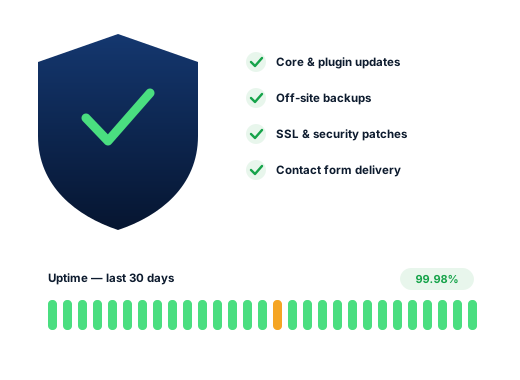
Core, theme and plugins patched on a regular cycle: snapshot first, then a phone check of the pages that matter.
Files and database copied to a separate location, with periodic test restores to prove the copies actually work.
Malware scans, limits on login attempts, old staff accounts closed, and emergency patches when a plugin weakness is made public.
An automated check on your home page every few minutes, with a person alerted if it stops responding.
Each form and booking tool sent a test inquiry every month, to confirm it really reaches you.
Hours, menus, packages, event dates and storm closures changed when you send them, with a reminder from us before each season turns.
Done carefully
Standards we keep for every client, set out here so you can check us against them.
The hosting login, the domain and the main admin password remain yours. We sign in under a separate user that you can delete in a click.
Maintaining your site does not make it ours. The monthly plans cover routine care; a badly neglected or compromised site first gets a one-off clean-up with its own price, agreed before work starts.
Ask us about your business
How we work
Four stages that move a Niagara Falls business from overlooked to shortlisted.
We read through your website and Business Profile and test your rankings from spots across town, Chippawa to Stamford.
We shortlist the searches that lead to paying customers and pair every one with a page built for it.
Fixes to the profile, site, content and listings, beginning where the gain is largest.
Each month, a short plain-language note on calls, messages and positions, and the next priorities.
Questions
The monthly plans include it: $300 Starter, $500 Growth, $700 Pro, billed in CAD, cancel any month. If the site is badly behind or has been hacked, a one-off clean-up comes first, priced after we inspect it.
Yes. We agree a short seasonal calendar with you, so summer hours, autumn menus, winter packages and holiday closures go up on time. You send the details; we make the change and remind you to update your Google listing as well.
Yes. Send us a short message and a clear notice goes on the site as soon as we can manage it. It comes down again when you reopen.
Most of the time. We start by listing what the site runs on, whose accounts hold the domain and hosting, and which problems cannot wait. You then get a written plan, with a price for anything beyond routine care.
We treat it as a one-off job. We strip out the malicious code, find and seal the way in, put back clean files from a backup when one exists, and ask Google to re-check the site if a warning was shown.
No. The host invoices you itself and the account remains in your name, which keeps you in charge. We are glad to suggest a solid provider and handle the technical setup with you.
Further reading
More on this subject for business owners in Niagara Falls and the region.
Any of these can be hired on its own; plenty of clients begin with one.
People look for each of these trades in their own way, so every page rests on its own research.
We will check, at no charge, your rankings between Chippawa and St. Catharines, name the businesses above you, and put the fixes in order.
Request my free audit